How to Choose Ergonomic Home Office Furniture to Boost Productivity
Since I occasionally began working from home, I have realized that office furniture serves not merely to provide convenience, but is also crucial for safeguarding one’s physical health. After working for long hours in a seated position, I began to experience discomfort in my lower back, spine, and eyes. So, I decided to select ergonomic furniture to improve my work environment. After using these products for a while, the results were remarkable. Not only did I reduce physical discomfort, but my productivity also improved. Today, I want to share my experience to help you select the right home office furniture.
1. A Suitable Office Chair: Relieving the “Pain” in Your Back and Waist
At first, I just picked an office chair online that looked good. It seemed fine to sit on, so I thought it was sufficient. After all, isn’t office work mostly about sitting? I didn’t think choosing a chair would be that complicated. However, over time, I started noticing a heavy feeling in my lower back, occasional backaches, and sometimes discomfort in my shoulders and neck after sitting for long periods. Gradually, I realized this wasn’t just due to being busy at work, but because my chair wasn’t providing enough support.
So, I began to focus more on ergonomic design, searching for a chair that could effectively alleviate these discomforts. I paid special attention to lumbar support and the adjustable backrest angle. I discovered that regular chairs couldn’t provide reasonable support for my spine, and prolonged sitting caused additional strain, leading to discomfort.
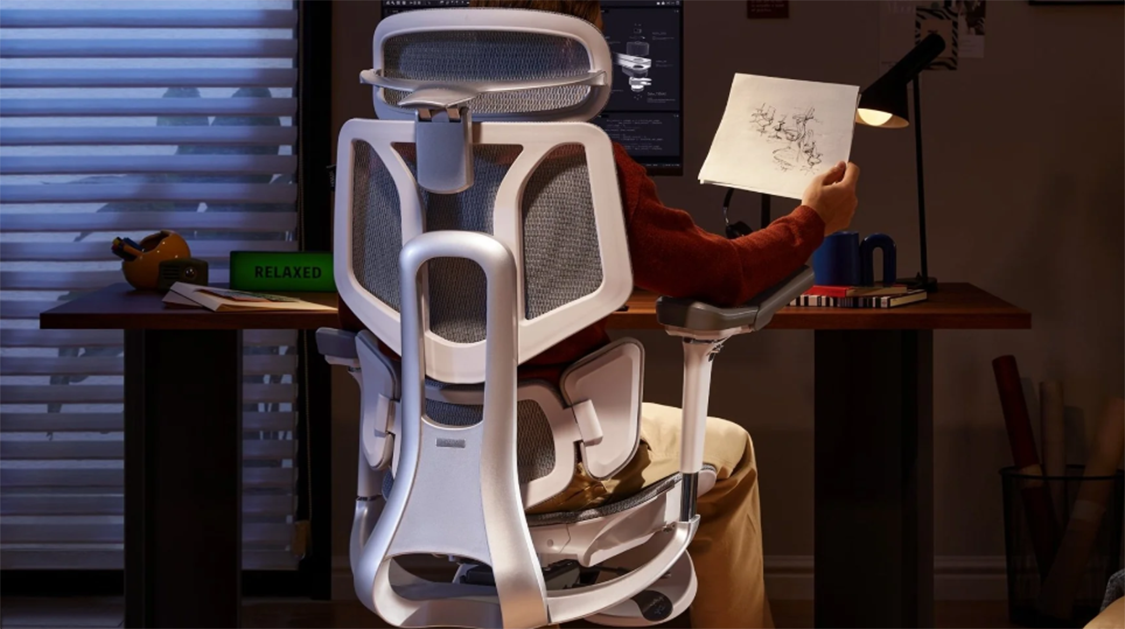
Eventually, I chose an ergonomic chair with adjustable features. The lumbar support design was a perfect fit for my back, especially at the lower back area, which could be adjusted to match my sitting posture. This design made me feel very comfortable without any sense of pressure, and I could work for long hours without feeling weight on my lower back. Even better, the backrest angle could be adjusted to avoid stiffness in my back caused by sitting too long. Once I adjusted my posture, the backrest seemed to “wrap” around my back, providing continuous support and significantly reducing fatigue after long periods of sitting.
Recommended Product: HBADA E3 Air Ergonomic Chair
Why recommend this chair?
- Ergonomic Design: Specially designed for long hours of work, it provides excellent lumbar support and effectively reduces lower back discomfort caused by prolonged sitting. The backrest design fits well, helping you maintain good posture and reduce spinal pressure.
- Adjustable Features: The chair has multiple adjustable options, including backrest angle, seat height, and armrest adjustment. This allows you to customize the chair to your comfort, significantly enhancing the work experience.
- Comfortable Seat Cushion: The seat cushion has moderate firmness, neither too soft to sink in nor too hard, ensuring long-term comfort without discomfort. It allows you to sit for hours without feeling pressure on your body.
- Breathable Mesh Design: The backrest and seat cushion are made of breathable mesh, which helps with air circulation and keeps you comfortable, especially for people working from home for long hours.
- Modern Design: The chair has a sleek, modern look that fits various office environments, providing high support while not appearing too flashy, making it perfect for both home offices and traditional office spaces.
Price: $329.00
2. Standing Desk: Alternate Between Sitting and Standing to Reduce Physical Strain
Long periods of sitting in one position not only decrease efficiency but also have negative effects on the body, especially on the spine and legs. As I started feeling discomfort in my waist and legs, I realized sitting for too long was putting a heavy load on my body. So, I decided to try a standing desk, and I found it not only helped relieve the discomfort caused by prolonged sitting but also boosted my productivity significantly.
Advantages of Standing Desks
The most notable benefit of a standing desk is its flexibility, allowing me to switch between sitting and standing freely. This alternation between sitting and standing helps me reduce back pain and maintain better focus and energy. For example, whenever my lower back feels uncomfortable or my legs go numb, I quickly adjust the standing desk’s height and stand up to move around. This not only relieves discomfort but also improves blood circulation, helping me regain energy. Standing also allows my spine and back to stretch naturally without constant pressure, making me feel lighter.
At first, I didn’t realize how much standing would impact me, but over time, I found that standing allowed my back and spine to naturally stretch, and alternating between sitting and standing made me feel more comfortable. When standing, my blood circulation improved, my mind felt clearer, and my focus became more concentrated, leading to a significant increase in productivity.
How to Choose the Right Standing Desk
When I decided to add a standing desk to my setup, I researched and learned how to choose the right one. Here are a few key points to consider when buying:
- Height Adjustment: A standing desk should have a height adjustment feature that helps you alternate between sitting and standing comfortably, reducing the pressure on your spine. In my experience, desks with flexible height adjustments significantly reduce the fatigue from sitting for long periods.
- Stability: The standing desk should be stable, regardless of its height. A wobbly desk disrupts work efficiency and can even interrupt your workflow. Stability was a crucial factor when I selected my desk. I suggest opting for electric standing desks, as they provide smoother, more stable transitions compared to manual ones.
- Ease of Use: The ease of adjusting the height of the desk directly impacts your workflow. While manual desks are cheaper, they can be cumbersome to adjust, especially if you change your position frequently. I ultimately chose an electric standing desk for its smooth, one-touch height adjustment, which made the process quick and hassle-free.
- Desktop Size: Choose a desktop that fits your space and work needs. If the desk is too large, it could make your space feel cramped, limiting your movement. If it’s too small, it might not provide enough workspace, affecting your productivity. Ensure you select a size that suits your workspace while keeping things neat and easy to access.
Personal Experience
When I first used the standing desk, I had a tough time adapting and often felt tired after standing for a while. However, over time, I learned how to adjust the standing periods. Initially, I stood for 10 minutes every hour, gradually increasing to 30 minutes and even longer, eventually finding the ideal balance. Now, the standing desk not only prevents discomfort from sitting too long but has also helped me develop healthier work habits. I no longer feel fatigued during work, as I can quickly adjust the desk height to stand and recharge whenever necessary.
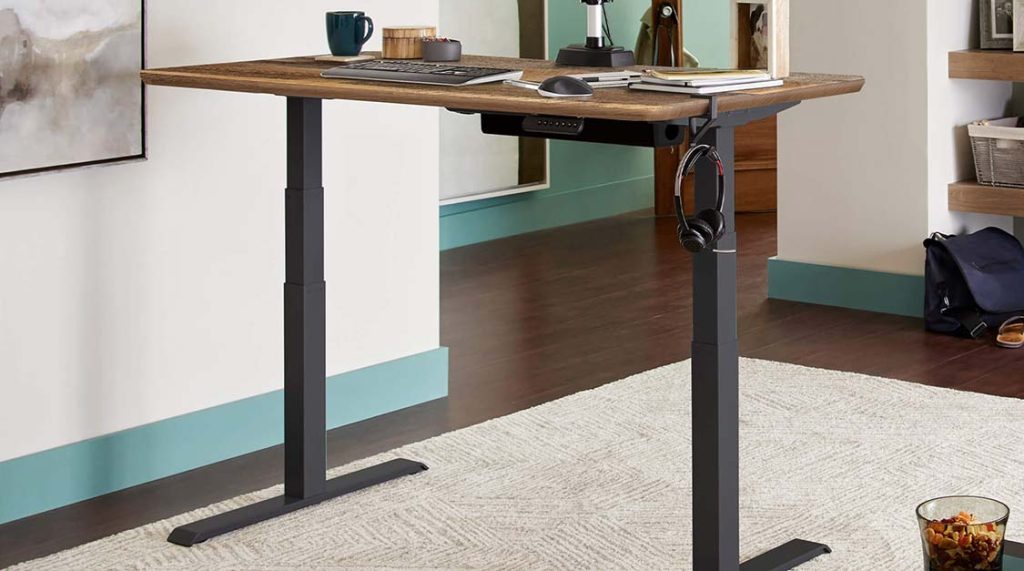
Recommended Product: FlexiSpot EC1 Electric Standing Desk
Why recommend this desk?
- Electric Adjustment: The FlexiSpot EC1 offers smooth electric height adjustment at the push of a button, making it perfect for users who frequently alternate between sitting and standing.
- Strong Stability: This desk is highly stable, ensuring the desktop remains steady whether it’s at its lowest or highest height, guaranteeing smooth work without interruption.
- Suitable Desktop Size: The desk has a moderate width that provides ample workspace without taking up too much room, making it perfect for most home offices.
- Ergonomic Design: This desk is designed with ergonomics in mind, allowing you to switch between sitting and standing easily to alleviate the pressure on your lower back.
Price: $299.99
3. Monitor Stand: Protect Your Neck and Reduce Fatigue
In the beginning, I didn’t realize the importance of the position of my monitor. Since I placed it too low, I often had to look down to see the screen. Initially, I didn’t think it was a big issue, but as I worked longer, I began to feel tension in my neck muscles, and after several hours, my neck and shoulders ached. Over time, I realized that my sitting posture was unnatural, and the strain on my neck and shoulders was affecting my productivity.
I realized that relying solely on the chair’s adjustment options wasn’t enough to solve my neck fatigue. I needed to adjust the position of my monitor to ensure a comfortable line of sight. So, I bought an adjustable monitor stand, and immediately felt the benefits.
Advantages of a Monitor Stand
The biggest advantage of a monitor stand is that it allows you to easily adjust the screen to eye level. Previously, I had to look down, which caused unnecessary pressure on my spine and neck. With a monitor stand, I could easily raise the screen to the right height, helping me maintain a natural posture and avoid straining my neck and shoulders.
In addition to relieving neck fatigue, the monitor stand made my workspace much tidier. With the monitor raised, my desk had more space, and things were more organized, giving it a minimalist feel. More importantly, the monitor stand increased my workspace height, making it easier to alternate between sitting and standing.
My Tips
- Choose a Stand that Fits Your Monitor Size: When selecting a monitor stand, make sure it can support your monitor’s size. Different monitor brands and models vary in size, so check the weight capacity and compatibility before purchasing.
- Adjustable Height and Angle: Choose a stand with a wide range of height and angle adjustments. This allows you to adjust the screen’s tilt and angle to avoid glare and discomfort, depending on the lighting and your preferences.
- Stability and Durability: The stability of the stand is crucial. If the stand isn’t stable, it might cause the monitor to wobble, affecting both the viewing experience and work productivity. Choose a high-quality, durable stand for safety and comfort.
- Design and Aesthetics: While functionality is the priority, design matters too. A sleek, modern monitor stand can enhance the aesthetic of your workspace and create a more enjoyable work environment.
Recommended Product: VIVO Adjustable Monitor Stand
Features:
- Height and Angle Adjustment: Supports monitor height adjustment, allowing the screen to be raised up to 15 inches to ensure the best viewing angle.
- High Compatibility: Fits monitors ranging from 24 to 32 inches and supports a strong weight capacity.
- Stability: Made from sturdy steel to ensure the monitor stays steady, even during height adjustments.
- Ergonomic Design: The stand’s flexible height, rotation, and tilt adjustments allow you to work in a more relaxed and natural posture.
4. Ergonomic Keyboard and Mouse: Reducing Wrist Strain
When I started using an ergonomic keyboard and mouse, the strain on my wrists was significantly reduced. Using traditional keyboards and mice for long periods caused discomfort, especially in my wrists, which would sometimes go numb. Over time, the strain increased, particularly during prolonged computer use, as the repetitive clicking and typing put a lot of pressure on my wrists.
The ergonomic keyboard design allows my wrists to be in a more natural position. Unlike traditional flat keyboards, ergonomic models use split designs and angled layouts, which help keep my fingers in a relaxed, natural position while typing.
Along with the keyboard, I also switched to an ergonomic mouse. This mouse is designed to fit the natural curve of your hand, making it comfortable to hold without needing to exert too much pressure. The ergonomic design prevents wrist and finger stiffness, making repetitive clicking and dragging far less tiring.
My Tips
- Test the Feel: Before purchasing ergonomic equipment, it’s best to try them out to see if they allow your wrists to stay in a natural, relaxed position.
- Keyboard and Mouse Design: Choose a keyboard that offers a split design or adjustable angles to help your wrists stay in a natural curve. For the mouse, select one that fits your palm’s natural shape to minimize strain.
Recommended Products:
- Logitech Ergo K860 Ergonomic Keyboard
Features: Split design that mimics natural wrist positioning, reducing pressure on wrists and fingers.
Price: $119.99 - Microsoft Sculpt Ergonomic Mouse
Features: Fits the natural curve of the hand, reducing wrist pressure, and offers an ergonomic grip.
Price: $39.99
5. Proper Lighting: Enhance Focus and Comfort
Without proper lighting, prolonged exposure to a computer screen can lead to eye fatigue. At first, I thought the room’s main light was enough, but after working long hours, my eyes would become dry, and my concentration suffered. Eye discomfort gradually began to affect my productivity.
I realized that lighting quality plays a significant role in the workspace. So, I purchased a desk lamp with adjustable brightness and color temperature, providing a more ergonomic light source. The brightness and color temperature could be adjusted based on the time of day and work needs, helping me avoid harsh light during nighttime work.
This lamp not only reduced eye strain but also helped me stay focused during long work sessions. My eyes felt more comfortable, and my attention span improved.
My Tips
- Choose a Lamp with Adjustable Brightness and Color Temperature: Ensure the lamp can adjust both brightness and color temperature. Harsh lighting can strain your eyes, while too little light can lead to fatigue.
- Avoid Direct Glare: The light should not shine directly into your eyes; choose one with a soft glow to minimize glare.
Recommended Products
- BenQ e-Reading Lamp
Features: Intelligent light-sensing feature adjusts the brightness automatically; color temperature is adjustable for different working environments.
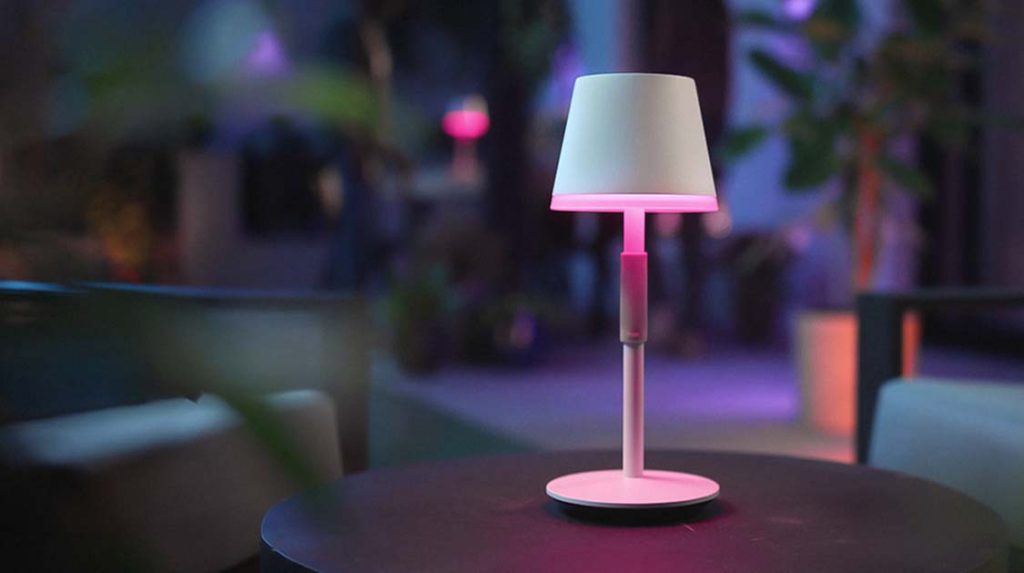
Price: $199.99 - Philips Hue White Table Lamp
Features: Adjustable color temperature and smart controls, providing soft, even light without glare.
Price: $79.99
Creating a comfortable and ergonomic workspace at home is crucial for both productivity and physical health. Through these improvements, I found that ergonomic furniture can significantly enhance your work environment. From the right office chair and standing desk to monitor stands, ergonomic keyboards, and good lighting, each upgrade has made me feel more comfortable and productive. I hope my experience will offer valuable insights and help you create a healthier and more efficient home office setup.